



Accounts Payable
Accounts Payable processes approved payments to suppliers through various payment vehicles, including but not limited to checks, electronic payments, and wire transfers.
1099 Announcement for 2025
Procurement Services has issued 1099-MISC and 1099-NEC forms to suppliers and individuals who received payments of at least $600 from the University during the 2025 calendar year and meet IRS reporting criteria. This may include any person or entity engaged in a trade or business, such as a corporation, partnership, individual, estate, or trust, that had reportable transactions in the calendar year. If a supplier or individual payee has not received their 1099 by February 16, 2026, and was expecting one, please have them complete the 1099 Information Request Form. This form will initiate a ticket for the Procurement team to research and provide the necessary assistance.
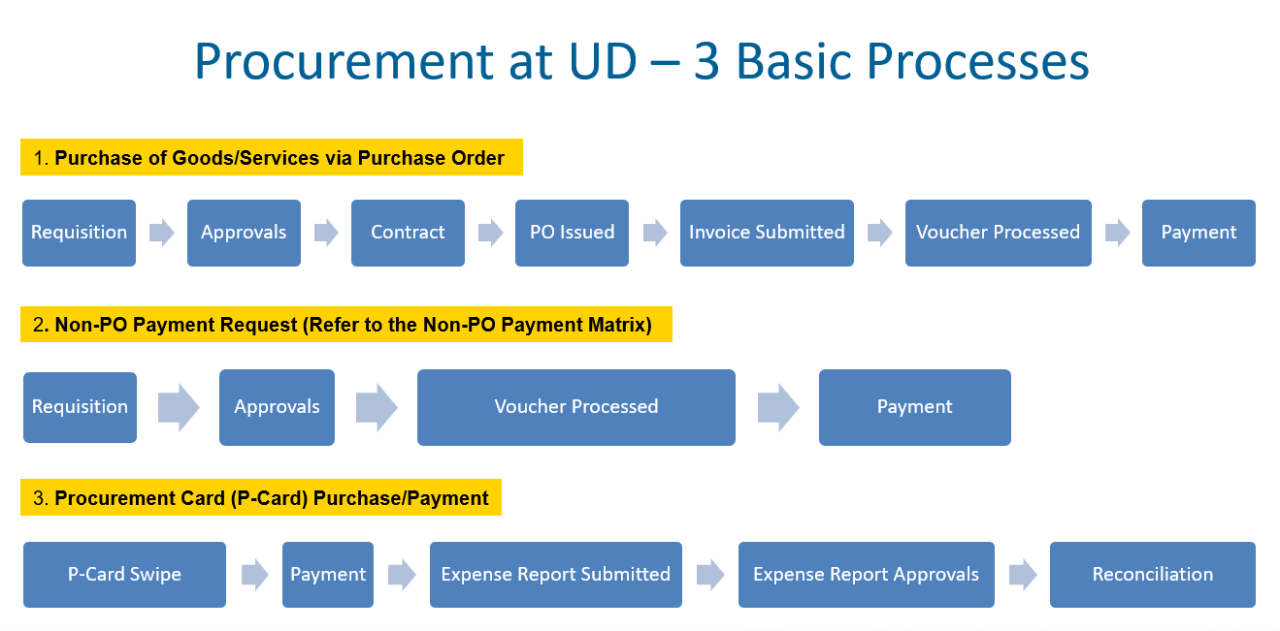
Most sourceable goods and services are purchased and paid for through the purchase order and payment process.
However, you may have a need to make a Non-PO Payment to a supplier for an engagement that is generally considered "non-sourceable". Examples include human subject payments, stipends, and government payments.
The Non-PO Payment Matrix provides a comprehensive list of allowable Non-PO payment types with definitions.
Because there are many types of payees and multiple payment vehicles, the matrix also outlines which payment vehicle should be used to make the payment depending on your payee type.
Non-PO Payment Request Form in UD Exchange
Completing the Non-PO Payment Request Form
Honorarium Payment Request Form in UD Exchange
Completing the Honorarium Form
Payment to Individuals (PTI) Guide
For successful, timely payments, an invoice needs to include the following:
- Supplier Name
- Invoice Number
- Invoice Date
- "Bill To" must be "University of Delaware"
- Remittance Address
- Purchase Order (PO) Number
- Amount Due
- Currency must be specified
All invoices requesting payment against an established Purchase Order should be sent by the supplier directly to accountspayable@udel.edu as instructed on the Purchase Order.
If an invoice does not contain the information listed above, the supplier will need to submit an updated invoice for payment.
All payment information for orders and forms in UD Exchange can be found on the Vouchers tab of the order form.
For payment information related to legacy webform orders and forms, please consult Payment Activity.
Check |
|
ACH |
|
Wire |
|
Ghost Card |
|
Virtual Payables (V-Pay) |
|
| Credit Card (P-Card) |
|
UDX Voucher Payment Status Types:
In Process
A voucher with “In Process” status is pending action in UD Exchange. It may require PO Owner Approval, or review by Accounts Payable if in an exception folder.
Payable
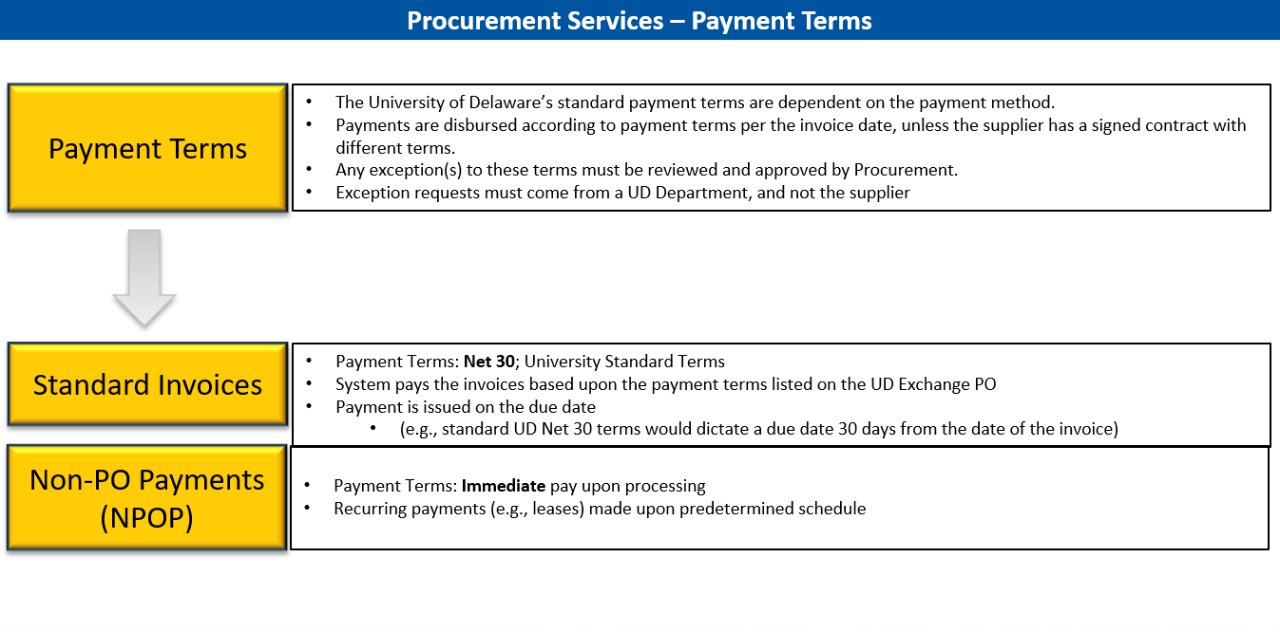
A voucher with “Payable” status has been completely processed through invoicing and is in queue for payment to be issued per payment terms. This means that an invoice will reside in the system with “Payable” status until payment is issued according to the PO/contract terms.
Paid
A voucher with “Paid” status has been paid per terms.
Canceled
A unit may request a voucher be canceled (in situations such as disputed charges). “Canceled” vouchers are edited with “DNU” as a prefix.