



Testing and Exams
Test Accommodation Center (TAC)
The Test Accommodation Center is a space where students with disabilities can take exams in a distraction-reduced environment with access to assistive technology, private restrooms and breaks as needed.
Hours of Operation
Spring and Fall Semesters: Monday–Friday, 8 a.m.–5:30 p.m.
Winter and Summer Sessions: Monday–Friday, 8 a.m.–4:30 p.m.
Location
Alison Hall, Suite 130
240 Academy Street
Newark, DE 19716
Important Reminder
Students planning to take their exam at the DSS Test Accommodation Center sign up at least one week (five business days) before the scheduled exam date. We recommend that you sign up for all of your exams as soon as possible.
Step 1: Navigate to the DSS Portal.
Log in to the DSS Portal using your UD credentials.

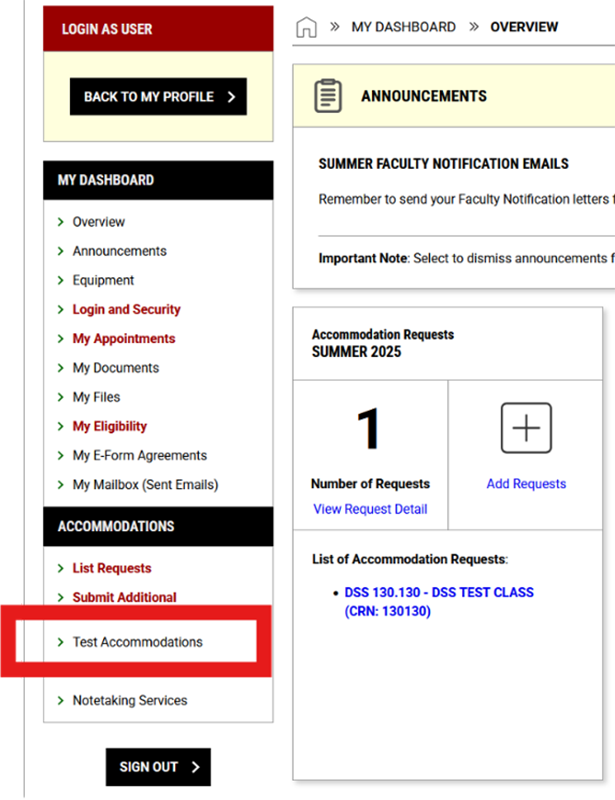
Step 2: Navigate to Test Accommodations.
In the menu on the left side of the screen, find the Accommodations section and select "Test Accommodations."
Step 3: Start your Exam Request.
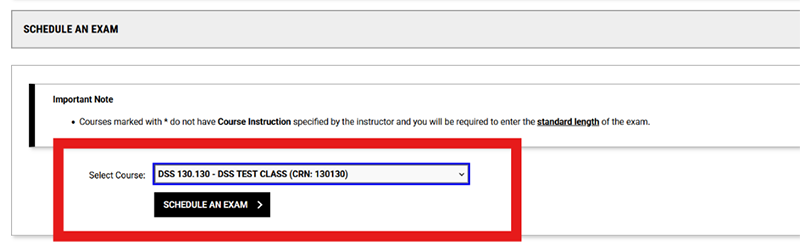
Find the "Schedule an Exam" tile. Select your course from the drop-down menu, then click "Schedule an Exam."
Step 4: Complete Exam Details.
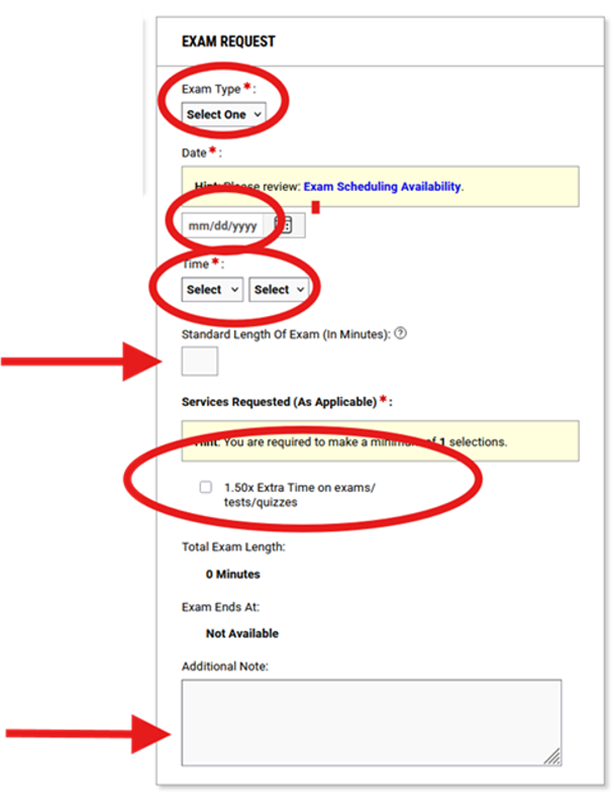
In the "Exam Request" tile, fill out the following information.
Required Fields:
- Exam Type
- Date
- Time
Optional Field:
- Standard Length of Exam (if known)
Accommodations:
- Select the specific accommodations you need for this exam under "Services Requested."
- Use the Additional Notes section to provide any explanations or special requests.
Important Note: If you need to take your exam at a different date or time than scheduled, you must obtain written permission from your instructor first. Email this permission to: dssproctor@udel.edu.
Step 5: Review and agree to the Terms and Conditions.

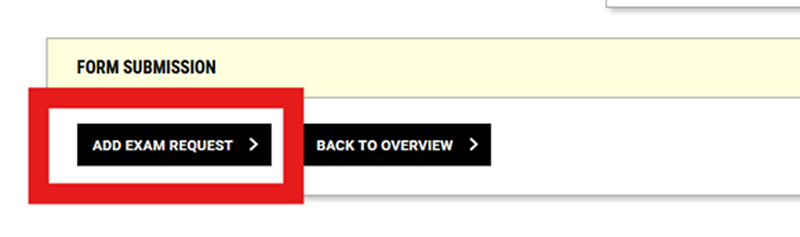
Step 6: Click Add Exam Request to submit your request.
Make sure you receive a green checkmark to indicate a successful submission.

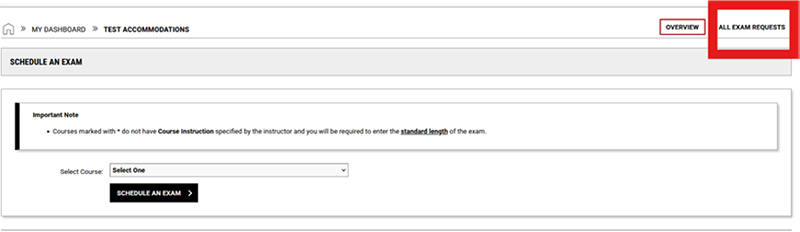
Step 7: Track your request in the DSS Portal.
To check the status of your scheduled exams:
- Go back to Test Accommodations
- Select All Exam Requests
- Your exam status will show as "Processing" until approved by the Test Accommodation Center
Your request will remain in "Processing" status until it receives "Approved" status from the Test Accommodation Center. You will also receive an email confirmation upon exam approval.

Exam Scheduling Policy
Most instructors will require students to take exams at the scheduled exam time and date.
If you need to take your exam at a different date or time than scheduled, you must obtain written permission from your instructor. Written permissions can be emailed to dssproctor@udel.edu.
Guidelines for Taking an Exam at the TAC
- You must arrive within 15 minutes of your scheduled exam start time.
- The following items are not permitted in the TAC without an approved DSS accommodation:
- Cell phones;
- Smart watches and wearable technology;
- Electronic devices;
- Earbuds, AirPods and headphones;
- Wallets and purses;
- Pencil cases;
- Hats and hoods;
- Coats, jackets and backpacks.
- All personal belongings must be stored in a locker except for your Student ID and any approved or required items for the test such as blue books, pencils, calculators, etc.
- The TAC adheres to all faculty instructions and to the University’s Honesty Policies. All cases of academic dishonesty will be reported to faculty. The TAC is monitored by proctors and surveillance cameras.
- If you are unable to take your scheduled exam, notify the TAC as soon as possible by contacting 302-831-8948 or dssproctor@udel.edu.
Need Help?
For questions about the Test Accommodation Center (TAC) or assistance with the Portal email dssproctor@udel.edu or call 302-831-8948.