



Class Rosters

Tools & Resources
Class Rosters
Viewing Class Rosters
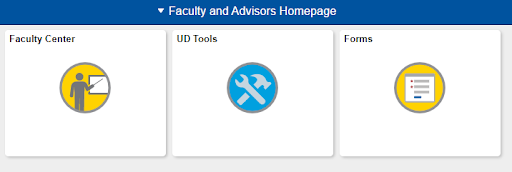
Instructors may view their class rosters in the Faculty Center tile of their Faculty & Advisors Homepage.
- Access UDSIS.
- On your Faculty & Advisors Homepage, click on the Faculty Center tile.
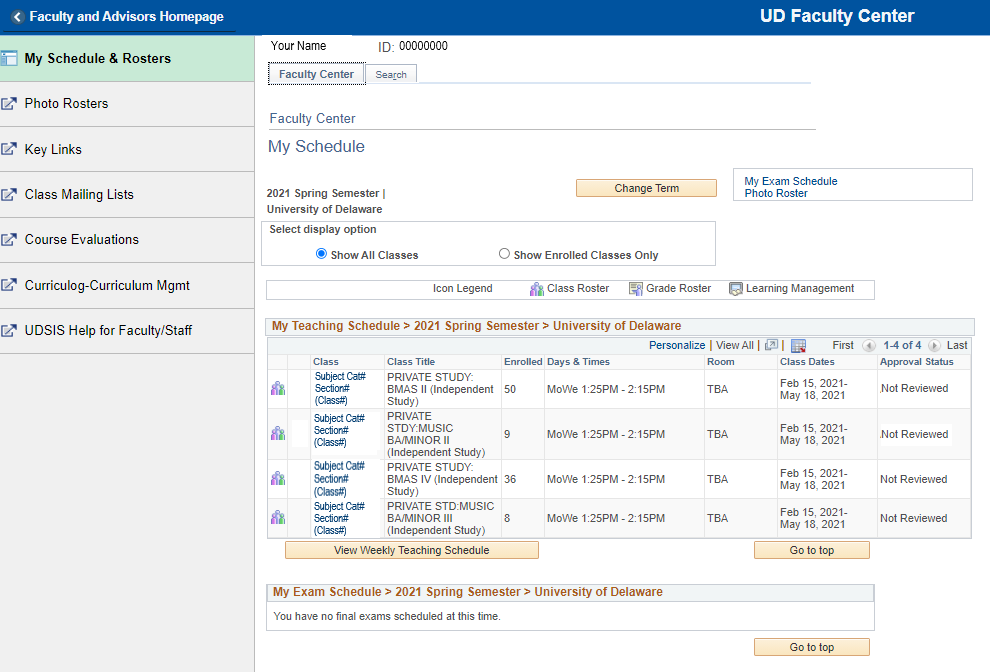
A list of your courses for the current term appears. (This may take awhile depending on the amount of data.) To select a different term, click the Change Term button, select a term and click Continue.
- Click on the Class Roster icon
 next to the course you wish to view. A new screen with the roster appears.
- To print the roster, click on the Printer Friendly Version link at the bottom, and then print the page from your browser.
- To download the roster, click the Download icon
 in the header bar of the roster table. If you have problems, check your browser setup concerning enabling pop-ups and trusted sites.
 - Need help with UDSIS Faculty Center and Class Rosters? See instructions.
Staff supporting Faculty: Use this help document to print class rosters and instructor schedules.
Credit Hours
For variable credit courses, the credit hours will be printed for all students. Credit hours will be printed for students in fixed credit courses only if the credit hours differ from the fixed hours of the course. Students who need to have their credit hours corrected can do so through WebReg only before the Academic Penalty Deadline.
Students Attending Who Are Not On The Class Roster
Students attending class who are not on the class roster are not registered for the course. They must register with the instructor/department and obtain Dean's approval using the online Course Permit Form, available in the Forms tile of their UDSIS Student Homepage.
For help with the Course Permit Form instructions, click here.
Students attending class who are registered in a different section of the same class must also correct their registration, obtaining necessary approvals, using the Course Permit Form.
If a student attending the class was on a previous roster but not on the current roster, they have most likely been canceled for non-payment of tuition by the Office of Student Financial Services. These students must work with Student Financial Services to pay their fees. Once the fees have been paid, Student Financial Services will notify the Registrar's Office to see if the student is able to be reinstated.