Mailing Lists at UD: Mailman mailing list instructions
IT no longer supports the creation of new Mailman lists. A Google Group will meet your needs instead.
How to use
From off-campus, you will need to connect using VPN for list configuration and administration. You may need to configure your list if the pre-configured options do not apply to how you want to use your list.
You can configure your mailing list at
the your list's Web page. The URL
will be of the form
http://udel.edu/mailman/admin/yourlist-name
substituting the name of your Mailman list for
yourlist-name.
The Web page for users of your mailing
list will have a URL like this one:
http://udel.edu/mailman/listinfo/yourlist-name
substituting the name of your Mailman list for
yourlist-name.
When you log in with your "List Administrative Password," you will first see a page with the following information:
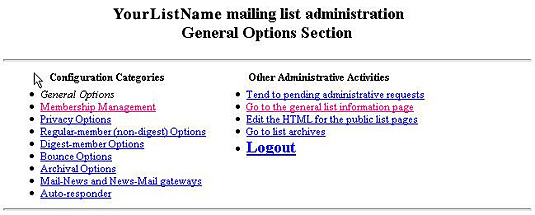
Configurations for each category
(not inclusive, key options are
described below).
|
Category |
Configuration |
||
|---|---|---|---|
|
General Options |
Complete terse phrase identifying
list. |
||
|
Membership Management |
Review member options and check
the legend item description for:
subscr, hide, nomail, ack,
notmetoo, digest, plain. |
||
|
Privacy Options |
Advertise list on listinfo Web
page if you prefer.
(preconfig: not
advertised) |
||
|
Regular-member Options |
Choose to allow list members to receive list mail immediately or only in batched digests. |
||
|
Digest-member Options |
If you are allowing the digest option (list mail received in batched digest form), you can think about the other options like the format of the digest (plain or mime), max. size in KB of the digest, etc. |
||
|
Bounce Options |
Use the default options. |
||
|
Archival Options |
For your archive of messages, you can tweak the settings for how often a new archive should be started or stay with the defaults. (preconfig: archives private) |
||
| Mail-News and News-Mail gateways | We don't use this feature. | ||
|
Auto-responder |
This option can be used if you want to automatically send a response to list posters. |
||
| Check the online documentation describing the other Administrative Activities. | |||
The configuration information is self-documenting—each parameter is explained by linking to the "Details" section.
Adding members
List administrators can add
members by going to the Membership
Management/Mass Subscription area. If
you want to have members
self-subscribe, send them to the
following Web page:
http://udel.edu/mailman/listinfo/yourlist-name
substituting the name of your Mailman list for
yourlist-name.
From off-campus, self-subscribers with UDelNet IDs will need to connect using VPN. Self-subscribers who do not have UDelNet IDs will need to send email to the list owner.
How to change a List owner
To change a list owner, the current
list owner (or someone with access to
the "List Administrator Password") may
log in into the list administration Web
page:
http://udel.edu/mailman/admin/yourlist-name
substituting the name of your Mailman list for
yourlist-name.
If access is no longer available to the list administration web page, please submit a request and provide the current list information and the requested changes. For list owner changes, include the new owner's name and UDelNetID.
How to request that the "List Administrator Password" be reset
If you are a list owner, please submit a request, provide the name of the mailman list and specify that the password is to be reset.
How to change a List name
If you are a list owner and need to change yourlist-name@udel.edu, please submit a request, provide the name of the old mailman list and specify the name of the new mailman list. All information will be migrated from the old mailman list to the new mailman list, and the old mailman list will be removed.
How to request that a Mailman list be Deleted
If you are the list owner, please submit a request and provide the name of the mailman list to be deleted. Please include the title of the list and indicate that the archive of messages can also be deleted.
If you have comments or suggestions about this Web page or see any errors, contact the IT Communication Group.